



Hunting Malicious Shortcut (.LNK) Files Using the VirusTotal API
Use the VirusTotal API to collect malicious LNK samples, analyze command‑line trends, and build Microsoft Defender for Endpoint KQL analytics for proactive threat hunting.
This post will discuss methodology for leveraging the VirusTotal (VT) API to gather malicious LNK samples and subsequently tailoring analytics to hunt for observed trends. The analytics presented are for Microsoft Defender for Endpoint (MDE) using KQL.
Introduction
As threat hunters, we must remain proactive in our approaches to identifying anomalous activity within the environments we are tasked to protect. However, based on our particular industry, tools, telemetry, and security controls, we might not be exposed to the latest threat actor TTPs or campaigns as often as other organizations. For instance, certain defense-in-depth configurations may block malicious files at the network perimeter long before they can reach and execute on an endpoint. In these cases, we may rely more heavily on external intelligence to build our threat hunts, as it is worthwhile to investigate such files to better understand the potential threat in the event that security controls are circumvented.
Thus, that is where the VT corpus comes into play. The VT corpus provides a wealth of telemetry for files we might not encounter otherwise. If utilized practically, VT can provide a broad overview of the threat landscape beyond your organization. It can also facilitate the identification of trends in threat actor activity for building threat hunts. Therefore, this blog post will cover using the VT API for gathering malicious shortcut files, which continue to offer an effective avenue of initial access.
Background on Shortcut Files
As the bulk of this post will cover the command line parameters contained within the target field of shortcut files, I will not spend too much time covering the basics of the file format. An excellent write-up of shortcut files by researchers at Cybereason can be found here. Accordingly, for the purpose of this hunt, we will focus on the following attributes of shortcut files:
- Shortcut files are graphical pointers to files, commands, or network resources.
- The initiating process in any process tree for an LNK attack is explorer.exe.
- Shortcut files are easily weaponized for initial access and are often chained with other techniques.
- The Windows GUI limitation for shortcut files is 260 characters, but the entire target field supports up to 4096 characters. This distinction is important as the GUI may not be representative of a shortcut file’s capabilities.
VirusTotal API and CLI
The VirusTotal API offers a variety of endpoints for retrieving data from its file corpus. In addition, VT makes it trivial to obtain data using its CLI tool, which can be run as a standalone executable or built manually. Please note, a VirusTotal API key is needed to utilize either resource. One of the advantages of using the CLI is the ability to query the VT corpus using VT Intelligence syntax. This allows us to construct precise queries to collect files in bulk. Although equivalent data can be accessed directly through the VT website, the number of samples you can view at once is limited. Likewise, only results visible on the page will available for download.
Gathering Malicious LNK Samples
In order to scope results for this blog post, we will focus on malicious LNK file samples which exhibit some type of network activity. That is, by querying LNK samples with network behavior, it may allow us to observe some of the latest initial access techniques for shortcut files in the wild. Using the VT CLI on our Windows host, we run the following command:

vt search "type:lnk have:behavior_network fs:30d+ p:15+ tag:long-command-line-arguments" -i sha256,exiftool.FileTypeExtension,exiftool.TargetFileDOSName,exiftool.CommandLineArguments,exiftool.LocalBasePath - format json - limit 1000 > lnk_output.json
A breakdown of the command is as follows:
- type:lnk — searches for LNK file extensions.
- have:behavior_network — files containing behavioral reports related to networks.
- fs:30d+ — first submission datetime to VirusTotal is in the last 30 days.
- p:15+ — file has been detected by 15 or more AV engines.
- tag:long-command-line-arguments — files containing the tag literal specified.
- -i — include only specific data from the file report. In this case, sha256, file extension, target file name, command line arguments, local path.
- – -format json- -limit 1000 > lnk_output.json — download the first 1000 results in JSON format and output to lnk_output.json.
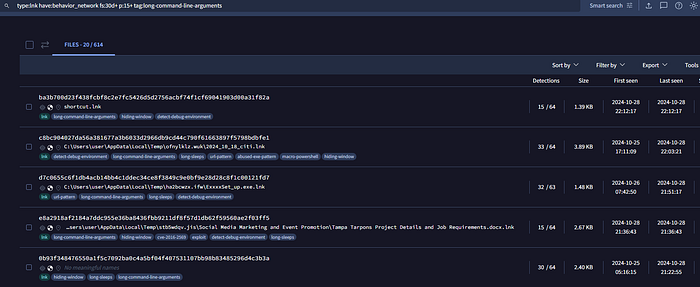
At the time of writing, our query returned 614 samples first submitted to VT during the last month. Next, let us review a small sample of results returned by our query. Each result in lnk_output.json will contain command line arguments, file extension, target file (the process the shortcut file points to), and SHA256 hash:
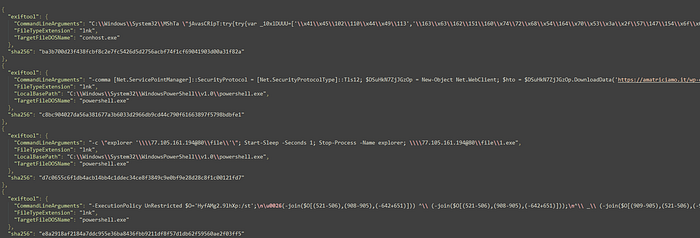
If we opted to run the equivalent VT Intelligence query through the VT website, the results would appear as follows:
Analyzing LNK Samples
At this point, we have a dataset comprised of 614 LNK file samples in JSON format. Our goal will be to aggregate the data and extract meaningful patterns of behavior by applying data analysis techniques. Of course, much of what we will explain can be accomplished with Splunk or similar enterprise tools. In general, this involves importing the JSON file, normalizing the data, and running queries against it. Correspondingly, the following sections will detail methodology in analyzing our dataset.
Stack Counting
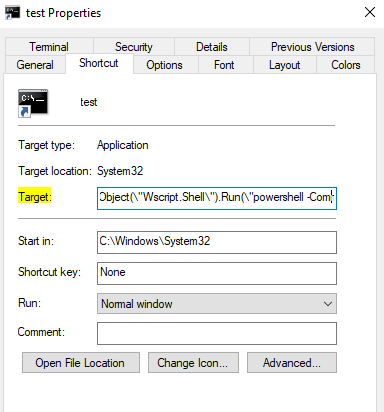
First, we utilize stack counting to procure the most common target field referenced in our LNK samples. For example, the LNK target field is highlighted in yellow:
We accomplish our stack counting by running a PowerShell command to extract the relevant TargetFileDOSName (target field) object from lnk_output.json and count the occurrences of each:
Get-Content lnk_output.json | ConvertFrom-Json | ForEach-Object { $_.exiftool.TargetFileDOSName } | Group-Object | Select-Object Name, Count | Sort-Object Count -Descending
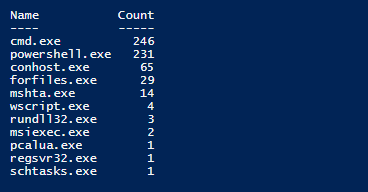
Note, our PowerShell command only accounted for 597 TargetFileDOSName values instead of the initial 614 results contained with lnk_output.json. The reason is due to some results not containing a value for TargetFileDOSName.
Overall, stack counting allows us to visualize which initial processes are being abused by malicious shortcut file submissions in the past month. We will make a mental note of these results for now and will translate these findings into MDE analytics later in this post.
Frequency Analysis: Preparing the Data
Conversely, the analysis of command line parameters within our dataset will be more nuanced given the variation in applicable syntax and arguments native to each process. Moreover, recall that each target field contains command lines which can span up to 4096 characters. Hence, stack counting will not be an effective method of analysis under these circumstances. Instead, we will analyze command line arguments individually by focusing on frequency within the dataset.
As such, we start with grouping command lines by target process and parsing each command line argument by using the space character as a delimiter. For this post, I will demonstrate against the top two target processes obtained from our stack counting: Cmd.exe and PowerShell.exe. The following PowerShell script will group command lines by process, parse each command line argument, and output results for each to a text file:
#Edit file name as needed
$jsonData = Get-Content lnk_output.json | ConvertFrom-Json
$objects = $jsonData

#Initialize an array to hold the extracted arguments
$extractedArguments = @()

#Loop through each object
foreach ($obj in $objects) {
    #Check if the TargetFileDOSName is cmd.exe
    if ($obj.exiftool.TargetFileDOSName -eq 'cmd.exe') {
        #Split CommandLineArguments by space and add to the list
        $arguments = $obj.exiftool.CommandLineArguments -split ' '
        $extractedArguments += $arguments | Out-File cmd_output.txt -Append
    }
    #Check if the TargetFileDOSName is powershell.exe
    if ($obj.exiftool.TargetFileDOSName -eq 'powershell.exe') {
        #Split CommandLineArguments by space and add to the list
        $arguments = $obj.exiftool.CommandLineArguments -split ' '
        $extractedArguments += $arguments | Out-File ps_output.txt -Append
    }
}
After running the script against lnk_output.json, Cmd.exe produced output containing 3,021 lines and PowerShell.exe yielded 1,726 lines (each line represents a command line argument). A small sample of each file is as follows:
Cmd.exe output:
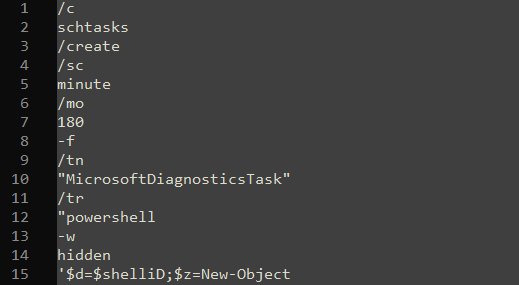
PowerShell.exe output:

Frequency Analysis: Visualizations
Once again, we will not be relying on enterprise-grade tools and will utilize free text analysis resources instead. Specifically, I found Voyant Tools to be the most in-depth and user-friendly tool for this task. With the Cmd.exe and PowerShell.exe dataset uploaded to the website, we can apply a simple visualization technique which relies on frequency analysis: word clouds. In essence, word clouds and individual word frequencies help illustrate integral patterns of command line arguments that may be employed during initial access via shortcut files. To that effect, the following word clouds are comprised of the top 25 command line arguments for Cmd.exe and PowerShell.exe datasets, respectively:
Cmd.exe

PowerShell.exe

Consequently, we can tailor MDE analytics to these observations and even emulate these techniques in our own environment to uncover potential detection gaps. Although the methodology is not perfect for capturing heavily obfuscated arguments, it still enables us to quickly formulate patterns within our dataset. Moreover, the word clouds do not provide much context on how a singular argument is utilized. In cases were interesting arguments arise, you may want to take a closer look at these results to gain relevant context for high-fidelity analytics.
Building our Threat Hunt Analytics
As the primary focus of our analytics will be initial access through shortcut files, we will incorporate some temporal logic for correlation. That is, analytics will target endpoints where explorer.exe creates a shortcut file, proceeded by explorer.exe spawning Cmd.exe or PowerShell.exe; however, Cmd.exe or PowerShell.exe must contain any number of command line arguments derived from frequency analysis. Finally, all of the activity must occur within a predefined time interval — in this case, we will set the value to within two minutes of shortcut file creation. To summarize, analytics will detect activity assuming the following scenario:
- Explorer.exe creates a shortcut file on endpoint A.
- Endpoint A also happens to launch Cmd.exe or PowerShell.exe with select command line arguments. The parent process for the activity must be explorer.exe.
- All activity occurs within 2 minutes of the initial shortcut file being created on endpoint A.
Since command line arguments denoted in the word clouds are unique to Cmd.exe and PowerShell.exe, we will separate analytics on a target process basis. Therefore, our analytics for detecting potential initial access via shortcut files spawning Cmd.exe or PowerShell.exe are as follows:
LNK File Creation and Suspicious Cmd.exe Activity
let cmd_args= dynamic (["start", "cls", "set", "exit", "hidden", "iex", "powershell", "http", "iwr", "text.encoding", "utf8" ]);
DeviceFileEvents
| where Timestamp > ago (30d)
| where InitiatingProcessParentFileName =~ "userinit.exe"
| where InitiatingProcessFileName =~ "explorer.exe"
| where ActionType == "FileCreated"
| where FileName endswith ".lnk"
| project LNK_Creation=Timestamp, DeviceName, InitiatingProcessAccountName, FileName
| join kind=inner(
    DeviceProcessEvents
    | where Timestamp > ago (30d)
    | where InitiatingProcessFileName =~ "explorer.exe"
    | where FileName in~("cmd.exe")
    | where ProcessCommandLine has_any (cmd_args)
    | project ProcessCreated=Timestamp, DeviceName, InitiatingProcessAccountName, FileName, ProcessCommandLine
    )
    on DeviceName, InitiatingProcessAccountName
| where ProcessCreated between ((LNK_Creation - timespan(0min)) .. (LNK_Creation + timespan(2min)))
| project LNK_Creation, ProcessCreated, DeviceName, InitiatingProcessAccountName, FileName, ProcessCommandLine
LNK File Creation and Suspicious PowerShell.exe Activity
let ps_args= dynamic (["https", "hidden", "windowstyle", "new", "echo", "object", "system.net.webclient", "start", "temp", "uri", "null", "process", "securityprotocol", "net.servicepointmanager", "uploads", "wp", "invoke", "webrequest" ]);
DeviceFileEvents
| where Timestamp > ago (30d)
| where InitiatingProcessParentFileName =~ "userinit.exe"
| where InitiatingProcessFileName =~ "explorer.exe"
| where ActionType == "FileCreated"
| where FileName endswith ".lnk"
| project LNK_Creation=Timestamp, DeviceName, InitiatingProcessAccountName, FileName
| join kind=inner(
    DeviceProcessEvents
    | where Timestamp > ago (30d)
    | where InitiatingProcessFileName =~ "explorer.exe"
    | where FileName in~("powershell.exe")
    | where ProcessCommandLine has_any (ps_args)
    | project ProcessCreated=Timestamp, DeviceName, InitiatingProcessAccountName, FileName, ProcessCommandLine
    )
    on DeviceName, InitiatingProcessAccountName
| where ProcessCreated between ((LNK_Creation - timespan(0min)) .. (LNK_Creation + timespan(2min)))
| project LNK_Creation, ProcessCreated, DeviceName, InitiatingProcessAccountName, FileName, ProcessCommandLine
Overall, these analytics should serve as a good starting point for a proactive threat hunt albeit, you may need to exclude certain command line parameters or common shortcut files depending on your environment.
Summary
In conclusion, I demonstrated how to leverage the VT API to obtain malicious LNK samples in bulk. We then analyzed the samples to extract meaningful patterns of behavior, which were then incorporated to threat hunt analytics. The methodology presented is applicable to other file types, dynamic behaviors, etc., provided you use the relevant VT intelligence query.
References
https://docs.virustotal.com/reference/overview
https://github.com/VirusTotal/vt-cli
https://virustotal.readme.io/docs/file-search-modifiers